SCD41 CO2 Sensor
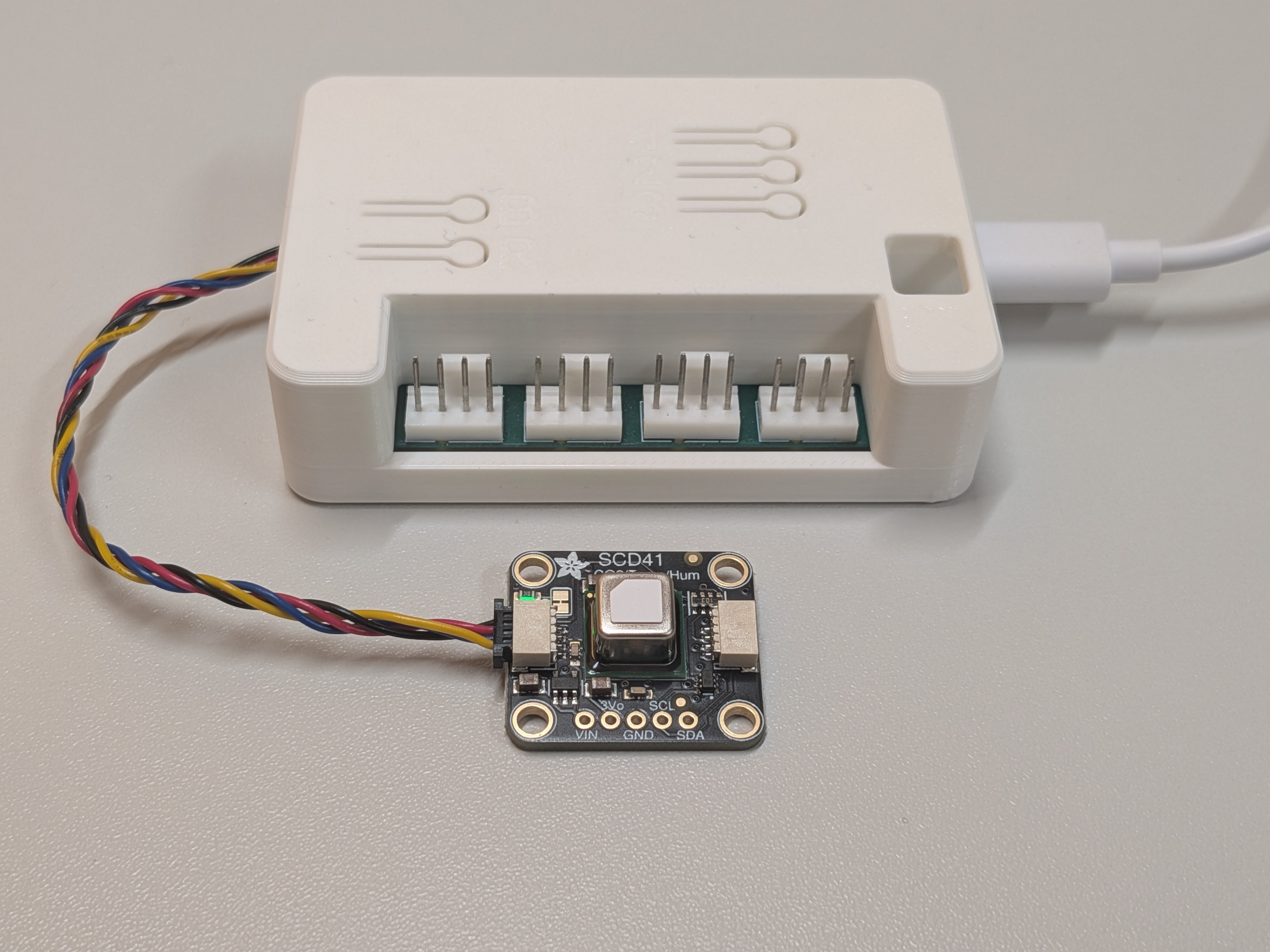
The Sensirion SCD41 measures real CO2 with a photoacoustic NDIR cell, not an estimate derived from a gas resistance. It also reports temperature and humidity. This example uses the Adafruit SCD41 breakout (#5190) (I2C address 0x62, Qwiic connector on board). Its 0x62 address does not clash with the onboard HDC1080 at 0x40.
If you only need an air-quality trend, the BME680 is cheaper. Reach for the SCD41 when you want an actual ppm number you can trust, for example to drive ventilation.
| Quick facts | |
|---|---|
| I2C address | 0x62 (fixed) |
| I2C max frequency | 100 kHz (hard datasheet limit) |
| Framework | Any (arduino or esp-idf) |
| Typical current | ~17 mA average at a 5 s measurement rate |
The 100 kHz limit is the one number that bites people. It is covered in Bus speed below.
Add it to your config
Section titled “Add it to your config”Plug the sensor into the Qwiic connector, then include the module as a package:
packages: hardware: ... # your hardware-rev-*.yaml scd41: url: https://github.com/zeroflow/wifi-fancontroller ref: main files: - modules/scd41.yamlThat is enough to bring up all three readings. Nothing else is required for a first boot. The two things you will most likely want to tune afterwards, the temperature offset and CO2 calibration, each have their own section below.
What you get
Section titled “What you get”| Entity | Unit | Notes |
|---|---|---|
| CO2 | ppm | The real measurement. Lightly median-filtered to drop single-sample spikes. |
| SCD41 Temperature | °C | Reads high from self-heating. Correct it with scd41_temperature_offset. |
| SCD41 Humidity | % | Relative humidity, derived on the same offset as the temperature. |
Why “SCD41 Temperature” and not “Temperature”
Section titled “Why “SCD41 Temperature” and not “Temperature””The onboard HDC1080 already owns the entity names “Temperature” and “Humidity”. If this module used the same names, you would get two entities fighting over one name in Home Assistant. So its temperature and humidity are prefixed with scd41_name (default SCD41). CO2 is unique to this sensor, so it keeps the plain name “CO2”.
This is a general rule for every expansion module, not something specific to the SCD41: an add-on that duplicates a measurement the board already makes must namespace its entities. You end up with two temperature readings, one at the board (HDC1080) and one wherever the SCD41 sits. That is expected, not a fault.
Bus speed: the 100 kHz rule
Section titled “Bus speed: the 100 kHz rule”One rule governs a shared I2C bus: the slowest device on the bus sets the ceiling. For the SCD41 that ceiling is a hard 100 kHz.
The shared bus (bus_a) runs at its 50 kHz default, so the SCD41 works out of the box and this module does not touch the bus speed. You only have to think about it when you combine devices:
| Device | I2C max | Comment |
|---|---|---|
| HDC1080 (onboard) | 400 kHz | Not a constraint |
| SCD41 | 100 kHz | Hard datasheet limit |
| SSD1306 OLED | 400 kHz | Works at 100 kHz, just refreshes more slowly |
So the collision to know about is SCD41 + OLED. The OLED page recommends raising the bus to 400 kHz for a smooth screen. You cannot do that with an SCD41 on the bus. Keep the bus at 100 kHz or below and both work; the display simply refreshes slower. Do it the other way around and the display is happy while the sensor stops working.
CO2 calibration: ASC vs FRC
Section titled “CO2 calibration: ASC vs FRC”This is where the support tickets come from. The SCD41 has two calibration mechanisms and they pull in opposite directions.
Automatic Self-Calibration (ASC)
Section titled “Automatic Self-Calibration (ASC)”ASC assumes that the lowest CO2 the sensor saw over the last several days was fresh outdoor air at ~400 ppm, and quietly re-zeros to that assumption. The module ships with ASC on (scd41_asc: "true"), because that is the safe default for someone who plugs the sensor into a normally-ventilated room.
Forced Recalibration (FRC)
Section titled “Forced Recalibration (FRC)”FRC sets the sensor straight against a known reference. The order of operations is the part people get wrong:
- Put the sensor in its final location and let it run in periodic mode for at least 3 minutes. Calibrate any sooner and you calibrate noise.
- Establish your reference CO2:
- Fresh outdoor air is about 420 ppm as of 2026 (it is not 400 anymore, and the number keeps rising, so date whatever value you use).
- Or read a co-located, already-calibrated CO2 meter.
- Send the reference value to the sensor.
ESPHome exposes this as the scd4x.perform_forced_calibration action. On its own that is not usable; you need something to trigger it. Drop this button into your own config and press it from Home Assistant once the sensor has settled:
button: - platform: template name: "SCD41 Calibrate to 420 ppm" entity_category: config on_press: - scd4x.perform_forced_calibration: value: 420 # your reference ppm id: scd41 # matches scd41_idTemperature offset: you have to measure it
Section titled “Temperature offset: you have to measure it”The default scd41_temperature_offset is 4.0 °C, which is a placeholder, not a value measured on this board. The sensor self-heats, so its raw temperature reads high, and the offset subtracts that. The reported humidity is derived from the same corrected temperature, so getting the offset right fixes both.
You are well placed to measure it here, because the onboard HDC1080 gives you a free reference sitting in the same enclosure:
- Set
scd41_temperature_offset: "0"and let the controller run at a steady temperature for 15 to 30 minutes. - Compare the “SCD41 Temperature” reading against the onboard “Temperature”.
- Set the offset to the difference (SCD41 minus HDC1080).
The offset depends on your enclosure and airflow, so treat 4.0 as a starting guess only.
Pressure and altitude compensation
Section titled “Pressure and altitude compensation”CO2 accuracy has a small dependence on ambient pressure. At altitude the air is thinner: Vienna sits near 975 hPa rather than sea-level 1013 hPa, a systematic error of a few percent if left uncorrected. Because this is location-specific, the module does not bake in a number. Set your altitude once with scd41_altitude:
files: - path: modules/scd41.yaml vars: scd41_altitude: "170m" # your install altitudeIf you happen to run a barometric sensor on the same bus (a BME680, for instance), you can feed its live pressure to the SCD41 instead of a fixed altitude by extending the sensor with ambient_pressure_compensation_source. That is an advanced option; the fixed altitude is enough for a stationary install.
Configuration variables
Section titled “Configuration variables”Set these under the package’s files: entry with vars: (see the full example below), or as top-level substitutions: in your config.
| Variable | Default | Purpose |
|---|---|---|
scd41_name | SCD41 | Prefix for the temperature and humidity entities |
scd41_id | scd41 | Component id prefix. Only a-z 0-9 _. Change it only if you run two instances |
scd41_address | 0x62 | I2C address. Fixed on the SCD4x, no reason to change it |
scd41_interval | 30s | How often the reading is published |
scd41_temperature_offset | 4.0 | °C subtracted for self-heating. Measure it |
scd41_asc | true | Automatic self-calibration. Set false in a closed enclosure |
scd41_altitude | 0m | Install altitude for pressure compensation |
IDs you can override
Section titled “IDs you can override”These are the component ids the module defines. They are the surface you can reach with !extend and !remove from your own config. The prefix follows scd41_id.
| ID | Type | Notes |
|---|---|---|
scd41 | sensor (scd4x) | The sensor block itself. Target for scd4x.perform_forced_calibration |
scd41_co2 | sensor | CO2 reading |
scd41_temperature | sensor | Temperature reading |
scd41_humidity | sensor | Humidity reading |
When you override a nested sensor you must repeat its platform line, but not i2c_id or address. For example, to give the CO2 entity a role name and drop the median filter:
sensor: - id: !extend scd41 co2: name: "Server Rack CO2" filters: []Bus and prerequisites
Section titled “Bus and prerequisites”- Requires the hardware package (it provides the shared I2C bus
bus_a). This module is not standalone. - I2C address:
0x62, fixed on the SCD4x. It does not collide with the onboard HDC1080 at0x40. - Bus speed: the SCD41 caps the shared bus at 100 kHz. The 50 kHz default is fine. Do not raise the bus above 100 kHz while an SCD41 is attached. See Bus speed and Combining Expansion Modules.
- Power: ~17 mA average at a 5 s measurement rate. Irrelevant on USB, worth a note if you ever budget for battery or PoE.
Full example
Section titled “Full example”A complete, compilable config: the hardware package, the SCD41 with ASC turned off for a closed enclosure and an altitude set, plus the forced-recalibration button.
substitutions:  wifi_ssid: "YourNetwork"  wifi_password: "YourPassword"
packages:  hardware:    url: https://github.com/zeroflow/wifi-fancontroller    ref: main    files: [hardware-rev-3.1.yaml]  scd41:    url: https://github.com/zeroflow/wifi-fancontroller    ref: main    files:      - path: modules/scd41.yaml        vars:          scd41_asc: "false"       # closed enclosure: calibrate by hand          scd41_altitude: "170m"
esphome:  name: my-fancontroller  friendly_name: My Fan Controller
esp32:  board: esp32-s2-saola-1  framework:    type: arduino
logger:api:ota:  - platform: esphomewifi:  ssid: ${wifi_ssid}  password: ${wifi_password}  ap:    ssid: "Fancontroller Fallback"captive_portal:
# Press this in Home Assistant after the sensor has run 3+ minutes in place.button:  - platform: template    name: "SCD41 Calibrate to 420 ppm"    entity_category: config    on_press:      - scd4x.perform_forced_calibration:          value: 420          id: scd41
Troubleshooting
Section titled “Troubleshooting”| Symptom | Likely cause |
|---|---|
| CRC errors, “communication failed”, readings drop in and out | Bus is above 100 kHz. Something raised bus_a (often for an OLED). Drop it back to 100 kHz or lower |
| Sensor missing from the I2C scan log | Cable not seated. The address is fixed at 0x62, so it is not an address clash |
| CO2 slowly drifts off over weeks | ASC is on but the sensor never sees fresh outdoor air. Set scd41_asc: "false" and run an FRC |
| CO2 is off by a fixed amount right after setup | Never calibrated in place, or FRC ran before the 3-minute warm-up. Redo the FRC |
| Temperature reads several °C high | Self-heating. scd41_temperature_offset is still the 4.0 placeholder. Measure it against the onboard sensor |
| CO2 reads a few percent off at altitude | scd41_altitude still at 0m. Set your real altitude |